
Free WordPress SEO plugin
Every SEO job in WordPress,
finished in one place.
Meta, schema, sitemaps, redirects, image SEO and GA4 — twenty-two modules under a single WordPress menu. AI drafts the repetitive parts across your whole archive, and Rocketship shows you which machines are actually reading your site.
Get ahead of the competition
Do at scale what your competitors
are still doing by hand
Rocketship SEO is not another set of SEO checkboxes. It is the same twenty-two jobs most sites do one page at a time, run across the whole library in an afternoon — plus the tools for the traffic your competitors cannot see yet.
Nothing ships with an empty field
Bulk generation writes titles and descriptions across a filtered set — one category, the last thirty days, or every post you have — and each suggestion is reviewed and applied or skipped individually. The pages a competitor never got round to optimising are the pages you already finished.
The library nobody else audits
Media Audits puts every attachment’s alt text, title, caption, description and filename in one searchable table, generates what is missing in bulk against a saved brand prompt, and exports the whole audit as CSV. Image SEO is the job that scales worst by hand, which is exactly why most sites skip it.
Read by the engines answering for you
Bot Detector names the AI crawlers reaching your site and charts what they take, while llms.txt serves them a file built from your own content and kept current as you publish. Conventional SEO tooling does not report this traffic at all.
The problem
SEO work is scattered, manual,
and mostly invisible
Most WordPress sites end up with optimisation spread across several plugins, a spreadsheet, and a browser tab that never gets opened. The work that matters least gets done first, and the work at scale never gets done at all.
Fragmentation
Six tools, six dashboards
Meta lives in one plugin, redirects in another, analytics in a separate browser tab, and image alt text nowhere at all. Every change starts by remembering which screen owns it.
One menu instead of six context switches.
Manual effort
Optimised one post at a time
Every description typed by hand. Every alt text opened, edited and saved individually, attachment by attachment, until the queue outlasts the afternoon you set aside for it.
Bulk operations across the whole archive.
Scale
Media libraries nobody audits
Thousands of images with no alt text, unhelpful filenames and empty captions — an accessibility and SEO gap that widens every week you keep publishing into it.
A full-library table you can actually work through.
Blind spots
An audience you cannot see
Readers increasingly take their answer from ChatGPT, Claude or an AI overview without ever loading your page. Conventional SEO tooling does not report that traffic at all.
Named crawlers, charted over time.
Everything included
Twenty-two modules, one WordPress menu
Rocketship SEO is not a single trick with a settings page attached. This is the whole plugin, grouped the way you would actually use it.
Content and metadata
Metadata
Meta titles & descriptions
Custom titles and descriptions for any post or page, with a live Google preview and character counters. Falls back to your title and excerpt when a field is left empty.
Nothing ships to search with a blank tag.
Structured data
Schema markup
JSON-LD for articles, websites, organisations and breadcrumbs, generated from information your site already holds.
Rich results without touching code.
Social
Open Graph & Twitter Cards
Control how a link renders when it is pasted into Facebook, LinkedIn or X, with a default image covering anything you have not set individually.
Shared links stop looking broken.
Readability
Table of contents
Automatically builds an in-page contents block from the heading structure you already wrote.
Long posts stay navigable.
Distribution
Google Preferred Source
Ships Google’s Preferred Source button as a Gutenberg block or shortcode, so returning readers can mark your site as preferred in Search. One switch turns it on or off, and it can be added to every blog post automatically — left, centre, right or below.
Turn loyal readers into a ranking signal.
Engagement
Content series
Group related posts into ordered or unordered series with drag-and-drop ordering and an optional pillar page. Each article gets a styled box of crawlable links — inline, as a floating panel or in a sidebar widget — plus CreativeWorkSeries schema.
Readers go to part two, not back to Google.
AI assistance — with your own key
Generation
AI meta generation
Draft titles and descriptions using GPT-4o, GPT-5, o1 or Gemini 1.5, chosen per site and billed to your own provider account.
An empty field is never why a post ships unoptimised.
Review
AI SEO analysis
Scores a draft from 0 to 100 and returns strengths, improvements, suggested keywords and concrete recommendations.
A second read on everything you publish.
Scale
Bulk AI tools
Filter posts by category or date, generate titles or descriptions for all of them, then apply or skip each suggestion individually.
Fix an entire archive in an afternoon.
Research
Keyword research
Semantic analysis and competition insight, available next to the content you are editing.
Research without a second subscription.
Strategy
Content gap & E-A-T analysis
GPT-5 backed strategy tools that look at what your coverage is missing and how your expertise signals read.
See what is absent, not only what is wrong.
Media and technical
Flagship
Media Audits
Every image’s alt text, title, caption, description and filename in one searchable table, with bulk generation against a saved brand prompt, safe renaming and CSV export. The largest module in the plugin.
The one job nobody does by hand, done in bulk.
Server
File rules editor
A proper .htaccess and robots.txt editor with a backup system behind it.
Edit server rules without FTP or a support ticket.
Continuity
Redirect manager
Catch URL changes and route them before they become 404s, with bot-aware rules and AI image protection that stops hotlinking, scraping and direct downloads of your uploads.
Keep the rankings you already earned.
Discovery
XML & visual sitemaps
A standard sitemap index with post and page sitemaps and per-item exclusion, plus an interactive map at /sitemap that real visitors can navigate.
One sitemap for crawlers, one for humans.
Speed
IndexNow
Pushes new and updated URLs to Bing and Yandex the moment you hit publish.
Discovery in minutes rather than crawl cycles.
Intelligence and coexistence
Visibility
Bot Detector
Identifies AI crawlers by user agent, charts their activity over time and per post, and separates what is training from what is answering.
See the audience your analytics never showed you.
AI readiness
llms.txt
Generates the file language models look for and serves it from your own content, kept current as you publish.
Tell the models how to read you.
Analytics
Google Analytics 4
Pageviews, sessions, users, bounce rate, top pages and traffic sources inside WordPress, plus per-post figures and a trend chart in the editor.
Stop leaving the editor to check a number.
Reputation
Google Reviews
Authenticate with OAuth to pull every review from your Business Profile, rather than the five an API key returns.
Every review, not a sample.
Coexistence
Compatibility system
Detects RankMath, Yoast, All in One SEO, SEOPress and The SEO Framework, prevents duplicate tags, and lets you choose feature by feature which one should win.
Trial it beside Yoast or Rank Math without a cleanup.
Protection
AI agent & scraper protection
Scores every visit from 0 to 100, then allows, monitors, challenges or blocks AI agents, headless browsers and scrapers. Real Googlebot and Bingbot are verified and always let through, it starts in monitor-only mode, and Cloudflare WAF and Turnstile are optional.
Keep scrapers out without losing a single crawl.
Inside the plugin
Real screens, not mockups
Every image below is an official WordPress.org screenshot, captioned by what it actually shows. The plugin’s newest modules do not have published screenshots yet, so you will not find one invented here.


Getting started
Four steps to a working setup
No onboarding call, no account, no licence key.
Install and activate
Install from the WordPress.org directory like any other plugin. Rocketship SEO appears as a single menu in wp-admin, with every module listed beneath it.
Choose your modules
Enable what you need in General Settings. Each module keeps its own screen, and anything you leave off stays off and adds no queries.
Add an AI key — optional
Paste an OpenAI or Gemini key to unlock generation, analysis and the bulk tools. Every traditional SEO feature works without one.
Crawlers Bot Detector identifies by name
Publish and watch
New URLs go to Bing and Yandex through IndexNow, llms.txt stays current, and Bot Detector starts logging which crawlers arrive.
In depth
Five modules worth a closer look
Five of the twenty-two, in the detail a card cannot carry — what each one actually does, and what it saves you doing by hand.
AI assistance
Suggestions where you already work
The AI panel sits in the Gutenberg sidebar and the Classic editor meta box, so generation and analysis happen without leaving the post.
- Titles and descriptions drafted on demand, reviewed before they apply
- A 0–100 content score with strengths, improvements and suggested keywords
- Your choice of OpenAI or Gemini model, billed to your own account
- Every suggestion editable — nothing is applied without you

Bulk tools
One run across the whole archive
The AI Tools screen applies the same generation to every post matching a filter, and still lets you approve them one at a time.
- Target all posts missing a meta title, the last 30 days, or a single category
- Or hand-pick individual posts from a list
- Suggestions arrive as a reviewable set, applied or skipped per post
- Runs on titles and descriptions alike
Media Audits
Image SEO across the entire library
The largest module in the plugin, and it exists because image SEO is the task that scales worst by hand.
- A searchable table of every image’s alt text, title, caption, description and filename
- Bulk generation for a selection, or for everything matching your filters
- A saved brand prompt so suggestions match your tone, services and keywords
- SEO-friendly filename suggestions with the extension preserved and conflicts handled
- CSV export and import, so you can edit offline and bring the results back
What the media audit table lists
| File | Alt text | Caption |
|---|---|---|
| hero-launch.jpg | Missing | Set |
| IMG_4821.png | Missing | Missing |
| team-photo-2.jpg | Set | Missing |
| screenshot-final.png | Missing | Missing |
| banner_v3_FINAL.jpg | Missing | Set |
Crawlers Bot Detector identifies by name
Bot Detector
The readers that never load your page
Search increasingly answers on your behalf. Bot Detector reports the traffic that conventional analytics leaves unlabelled in the server log.
- AI crawlers identified by name, charted over time and per post
- Classification separating training crawlers from answering ones
- User-agent rules and redirects for bots you would rather not serve
- Pairs with llms.txt so you control how models read the site
Analytics
GA4 figures inside WordPress
Connect a GA4 property once and the numbers live where you edit, not in another tab.
- Pageviews, sessions, users and bounce rate over 7, 30, 90 or 365 days
- Top pages and source/medium breakdowns
- A per-post metabox with a 7-day trend for the page you are editing
What the GA4 panel reports
Comparison
A different shape of SEO plugin
Not a criticism of the established plugins — they are good at what they do. This is simply where Rocketship SEO puts its weight.
The conventional approach
Optimise a page at a time
- –Metadata edited post by post, in the post
- –Image alt text handled one attachment at a time
- –Analytics read in a separate browser tab
- –Redirects and server rules handled by another plugin
- –AI crawler traffic left unlabelled in the access log
- –Search engines wait for the next crawl to notice a change
Rocketship SEO
Operate on the whole library
- ✓Bulk generation across a filtered set of posts
- ✓A full-library media table with CSV export and import
- ✓GA4 figures in the dashboard and in the editor
- ✓Redirects, .htaccess and robots.txt in the same menu
- ✓AI crawlers identified by name and charted over time
- ✓IndexNow pushes new URLs to Bing and Yandex on publish
What it costs
The plugin is free. The AI is billed at cost.
Rocketship SEO adds no margin to AI usage — you connect your own OpenAI or Gemini key and pay the provider directly. These are the plugin’s own published estimates per suggestion.
| Model | Per suggestion | Best for |
|---|---|---|
| OpenAI | ||
| GPT-4o-mini | $0.001 – $0.002 | Fast and cost-effective. The default for most sites. |
| GPT-4o | $0.01 – $0.03 | Better quality on longer or more technical drafts. |
| GPT-5 | $0.03 – $0.08 | Most capable, for complex SEO analysis. |
| o1-preview | $0.05 – $0.15 | Reasoning-heavy strategy work. |
| Google Gemini | ||
| Gemini 1.5 Flash-8B | $0.0001 – $0.0003 | Ultra-fast, for simple bulk passes. |
| Gemini 1.5 Flash | $0.0005 – $0.001 | Fast with good quality. |
| Gemini 1.5 Pro | $0.002 – $0.005 | Best overall Gemini quality. |
| Gemini Pro | $0.001 – $0.003 | Stable and reliable. |
$1 – $5
Typical month on OpenAI
For regular optimisation work
$0.50 – $2
Typical month on Gemini
Same work, cheaper models
$0
Cost of the plugin
No premium tier, no seat pricing
- No AI key? The plugin still works. Meta fields, schema, Open Graph, sitemaps, redirects, IndexNow and the file editors are all independent of AI.
- You see the bill. Usage lands in your own OpenAI or Google console, at their rates, with their spending caps available to you.
Before you install
Questions worth asking first
Straight answers, including the ones that are not flattering. Every figure below comes from the WordPress.org plugin directory.
Do I need an AI key to use the plugin?
No. Every traditional SEO feature works without one — meta titles and descriptions, schema markup, Open Graph and Twitter Cards, XML sitemaps, redirects, the file rules editor and IndexNow. An OpenAI or Gemini key only unlocks the generation, analysis and bulk modules.
How do I connect an AI provider?
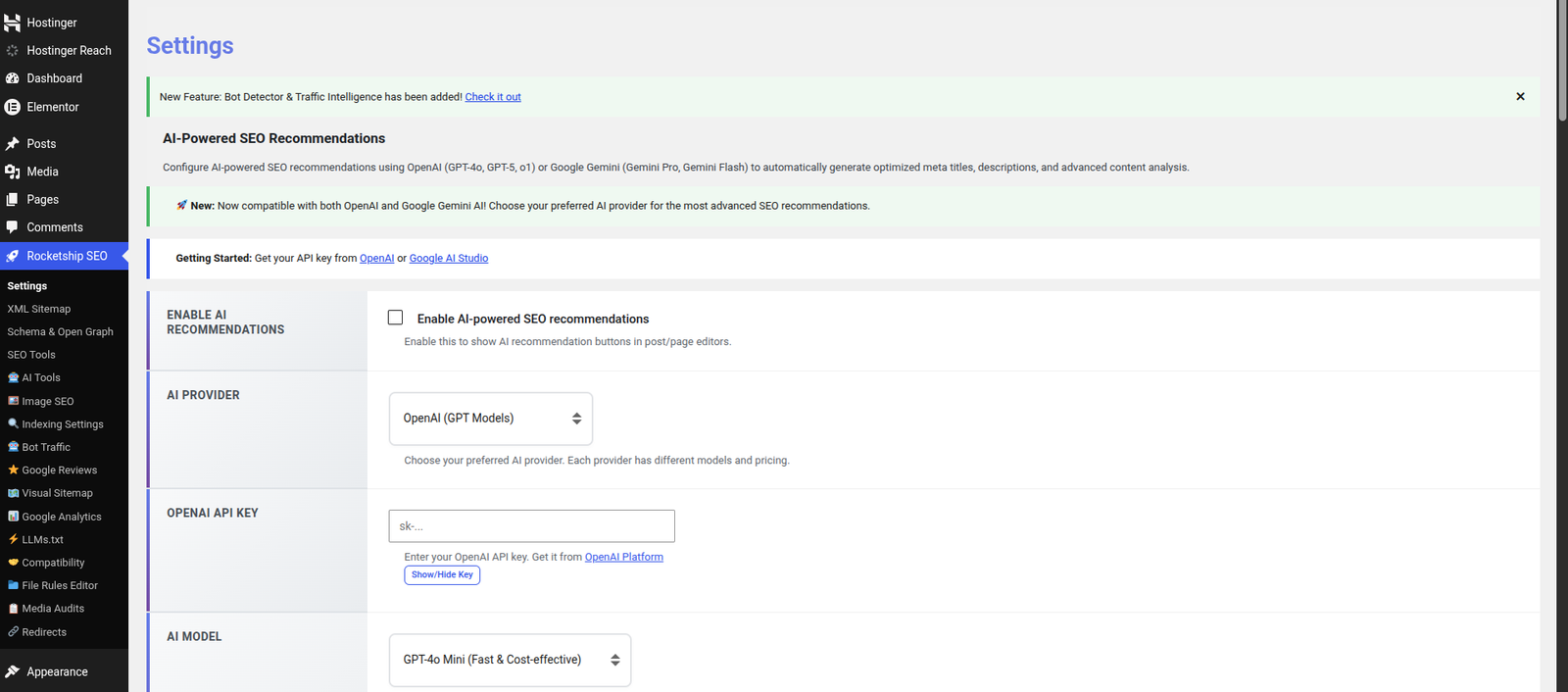
Create a key with your provider, then open Rocketship SEO › General Settings and fill in the AI-Powered SEO Recommendations section.
- OpenAI — create a key at platform.openai.com, select OpenAI as the provider, paste the key and pick a model.
- Google Gemini — create a key in Google AI Studio, select Google Gemini, paste the key and pick a model.
Then enable AI recommendations and the features become available in the editor.
Which model should I choose?
Start cheap and move up only if the drafts are not good enough.
- GPT-4o-mini or Gemini 1.5 Flash — fast, inexpensive, fine for most sites.
- GPT-4o or Gemini 1.5 Pro — better quality on longer or more technical content.
- GPT-5 and o1-preview — for complex analysis and strategy work, at a noticeably higher cost per call.
Will it conflict with Yoast or Rank Math?
The compatibility system is built for exactly this. It detects RankMath, Yoast SEO, All in One SEO, SEOPress and The SEO Framework and shows an admin notice when it finds one.
- Choose feature by feature which plugin wins — title, description, schema, Open Graph, Twitter Cards.
- If you select no overrides, Rocketship SEO disables its own meta output entirely, so nothing is duplicated.
That makes it safe to install alongside your current plugin while you evaluate it.
Is there a premium tier?
No. The plugin is GPL-2.0 and every module described on this page is in the free download. The only money involved is what you pay your AI provider directly, if you choose to use the AI features at all.
How new is this plugin?
New. Version 1.0.78, last updated on 16 October 2026, with 5,284 downloads and five five-star reviews on WordPress.org. It is tested up to WordPress 7.0.7, requires WordPress 5.0 or higher and PHP 7.0 or higher. We would rather you knew that than found out after installing.
5.0
Rating on WordPress.org
From 5 five-star reviews
5,284
Downloads
Since first release
5.0 – 7.0.4
WordPress compatibility
Tested up to 7.0.4
PHP 7.0+
Server requirement
Runs on current hosting
Your WordPress SEO,
finally in one place.
Install from the WordPress.org directory, enable the modules you need, and keep the SEO plugin you already run while you decide.
Free and GPL-2.0 · Version 1.0.78 · No account required